How I turned a one-size-fits-all EV dashboard into a role-based product that could scale
ChargeX, a German startup in e-mobility space, was expanding from one main customer type into fleets, SMEs, residential buildings, and hospitality. But the six-year-old dashboard still treated every admin the same.
I led the redesign as the solo product designer. My biggest contribution was helping the team understand who the product was actually for, then using that shared understanding to reshape the architecture and improve the most important operational workflows.
Impact:
Customer segments unlocked
3×
station lookup time
2m → < 40s
Active session support tickets
↓ dropped by 60%
Note: To respect NDA commitments, certain details in this case study have been blurred .
🎯 Solo Product Designer
🤝 Close collaboration with PM + Development Lead
🔄 Continuous input from Customer Success, Sales, and Stakeholders
📊 Insights from interviews, support tickets, and usage data
⚙️ Agile delivery with iterative design–build–validate cycles
Industry
B2B SaaS | E-Mobility, Electric Vehicle Charging
Company
ChargeX GmbH | München, Germany
🔴 The Problem
I joined to improve the dashboard, but the deeper problem was that nobody agreed on who the admin was
The dashboard had originally been designed around one main type of customer. As ChargeX expanded, new admins arrived with very different responsibilities, technical knowledge, and expectations.
Sales, Customer Success, Product, and Engineering all had useful knowledge about these users, but that knowledge was fragmented. There was no shared user model guiding product decisions.
So the team kept discussing individual features without a clear view of who each feature was really for. I identified that as the main risk behind the redesign.
🤓
I slowed down feature delivery to understand who we were actually designing for
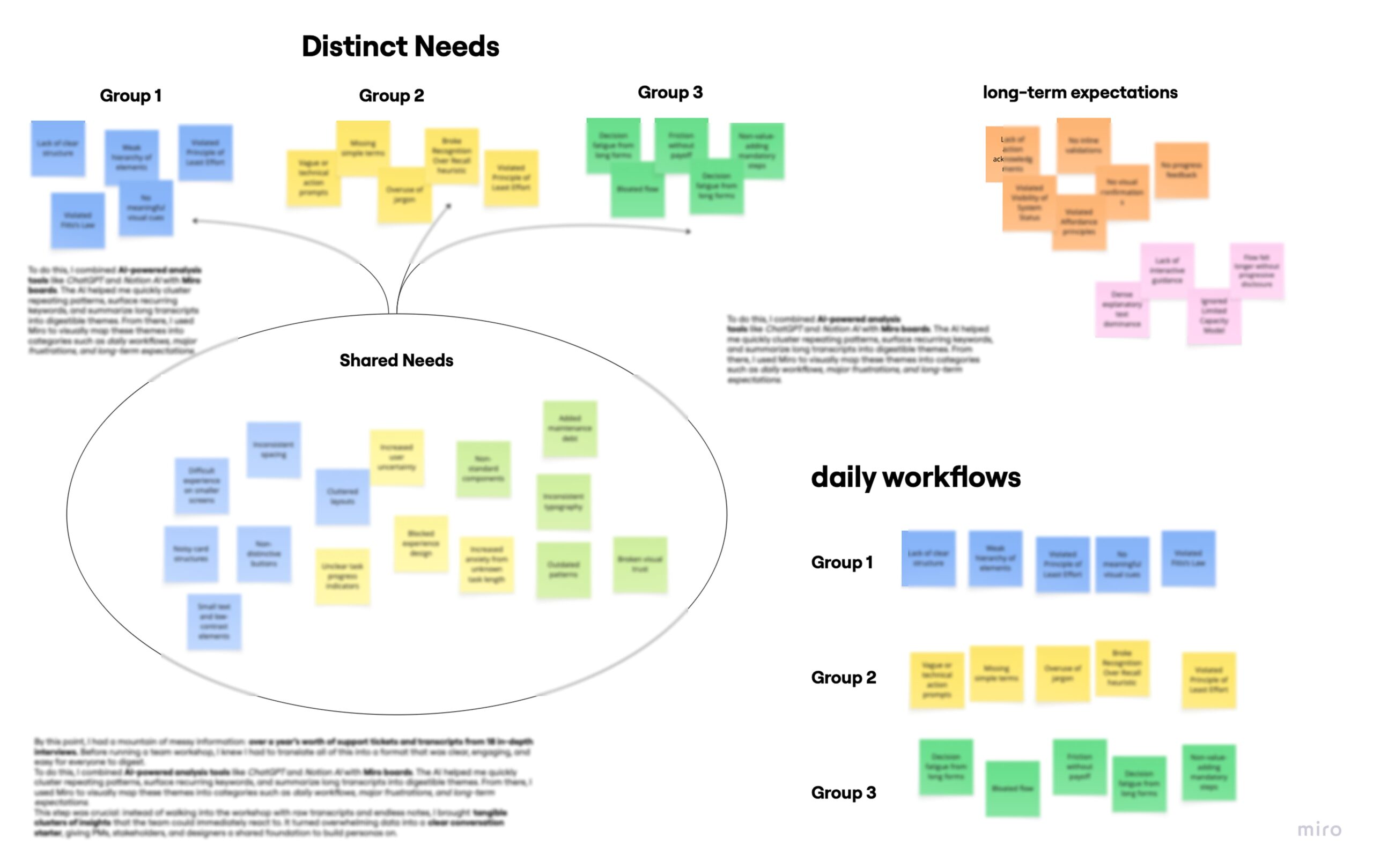
I combined support evidence, internal knowledge, and 18 interviews because no single source gave me the full picture
At first,
I started with one year of support tickets to understand which tasks repeatedly created problems. ( in collaboration with CS Team)
That surfaced two especially important workflows: finding the right charging station and understanding which modules were actively charging.
But,
The tickets could not explain why different admins struggled in different ways. So I conducted 18 semi-structured interviews across different customer contexts and continued until the themes stopped changing meaningfully.
The interviews showed that these users did not only have different tasks. They had different mental models of the product. A fleet manager saw it as an operational system. A hotel manager saw it as a service for guests. A residential admin needed a much simpler management tool.
That was the evidence I needed to argue that one generic dashboard structure would not scale
Synthesizing research ...
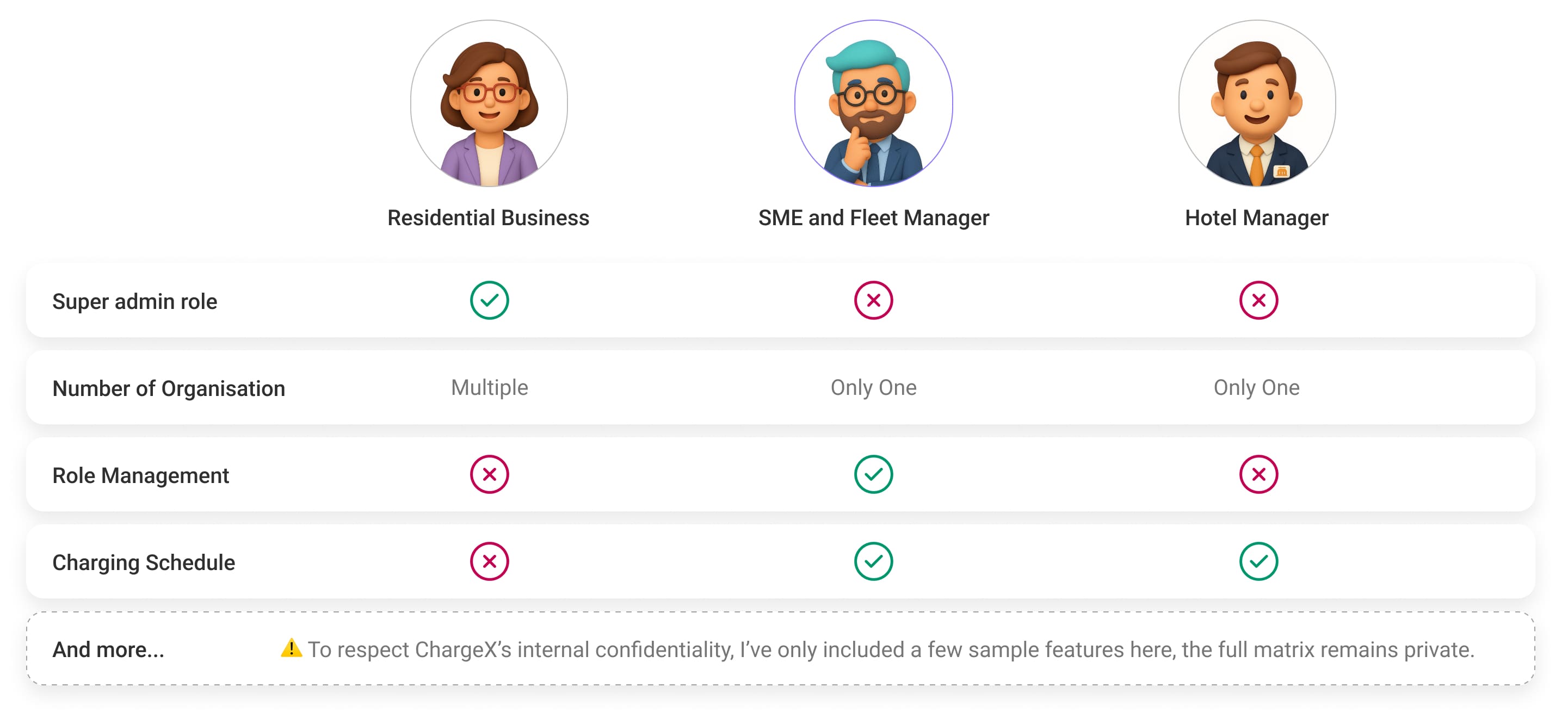
Then, I turned fragmented research into three core admin roles and give company one shared language for discussing customer needs and product priorities.
Meet the people who shaped my design decisions
(with a Focus on SME & Fleet Managers in This Case Study)
Meet Clara,
Residential Building Admins
Managing tenants, shared chargers, and recurring administration.
- Keep tenant charging transparent
- Manage cards and user permissions
- Export reports for property management
- Flexible views for different management tasks
This Is Who I Optimized For Here
Meet Markus,
Fleet & SME Managers
Running daily charging operations across many users and stations.
- Need a fast overview of charging activity
- Manage many users with minimal effort
- Automate billing across user groups
- Solve operational issues independently
Meet Tom,
Hotel Managers
Keeping charging simple and reliable for guests.
- Ensure chargers are available for guests
- Monitor live sessions at a glance
- Keep staff workflows simple
- Connect charging with guest billing
Once the roles were clear, I mapped their responsibilities, shared workflows, access needs, and feature priorities.
That showed me where the product could use common patterns and where each role needed a different level of control or a different entry point.
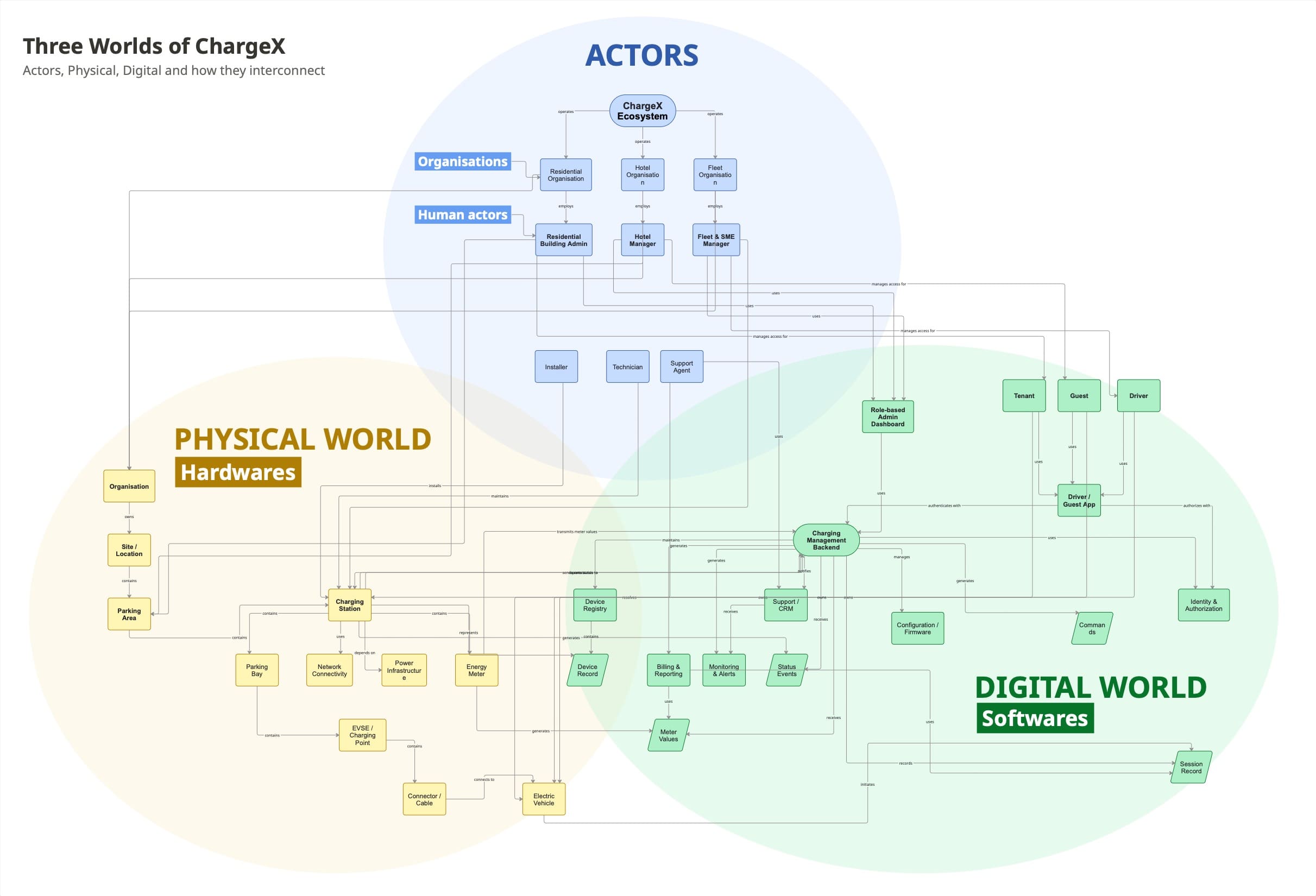
I mapped the whole ChargeX ecosystem to understand how each admin moves between the physical and digital worlds, so I could design their experience beyond the interface
After defining the three admin roles, I still needed a clearer picture of the system they were operating within. Each role touched a different mix of organisations, sites, charging hardware, users, sessions, billing, and software tools. Understanding those touchpoints helped me make better decisions for each role without looking at the dashboard in isolation.
So I created an ontology map to make those relationships visible. It helped me see which parts of the ecosystem each admin touched, where their responsibilities overlapped, and where their needs started to diverge. The research interviews and support-ticket analysis validated the personas; the ontology gave me the structure to understand the world around them.
This was not a one-time deliverable. It evolved like a puzzle: whenever I discovered a new dependency, actor, or system relationship, I added it to the map. Over time, it became a shared reference I could return to when designing new features, introducing another role, or deciding how one product change might affect several parts of the ecosystem.
The version shown here is an abstracted reconstruction due to company NDA.
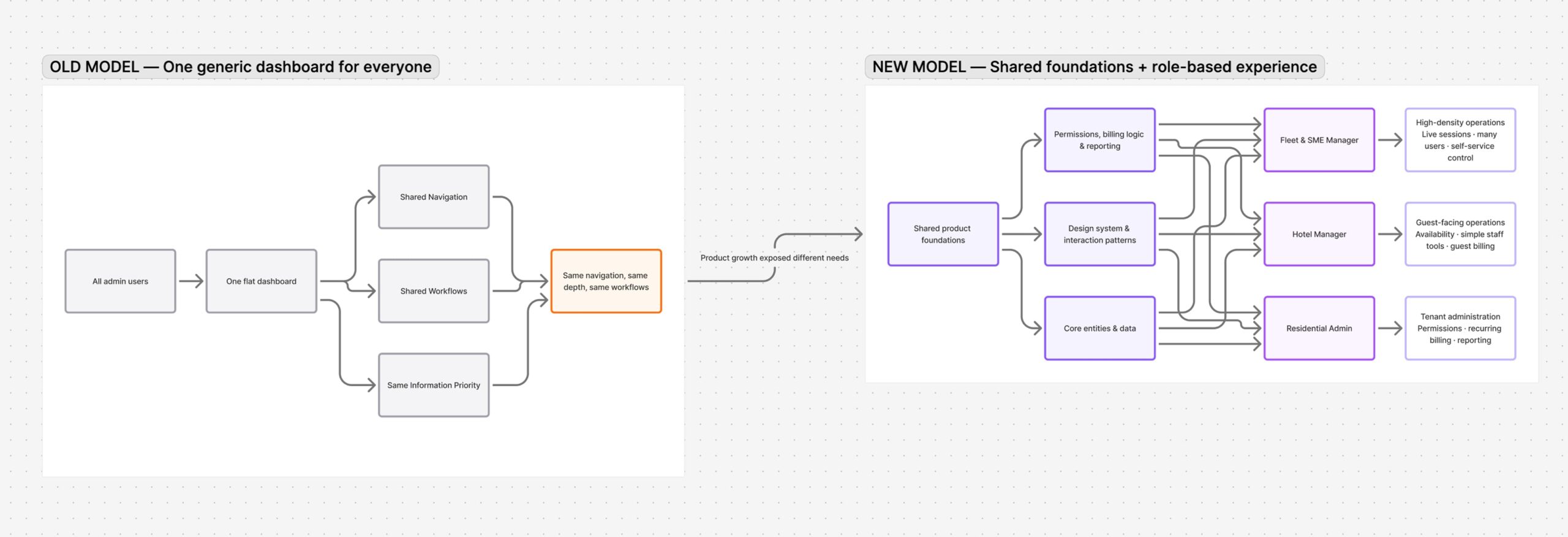
Then, I aligned the team around a scalable role-based architecture instead of adding more features on top of a weak foundation
Trade-off - I chose long-term scalability over faster feature delivery
I proposed a role-based architecture rather than continuing to place new features into the same generic dashboard. This gave future features a clear user context and helped Product, Sales, and Customer Success discuss the platform more consistently.
This required more upfront work and delayed some short-term features, but it reduced the risk of rebuilding the architecture again as the customer base grew.
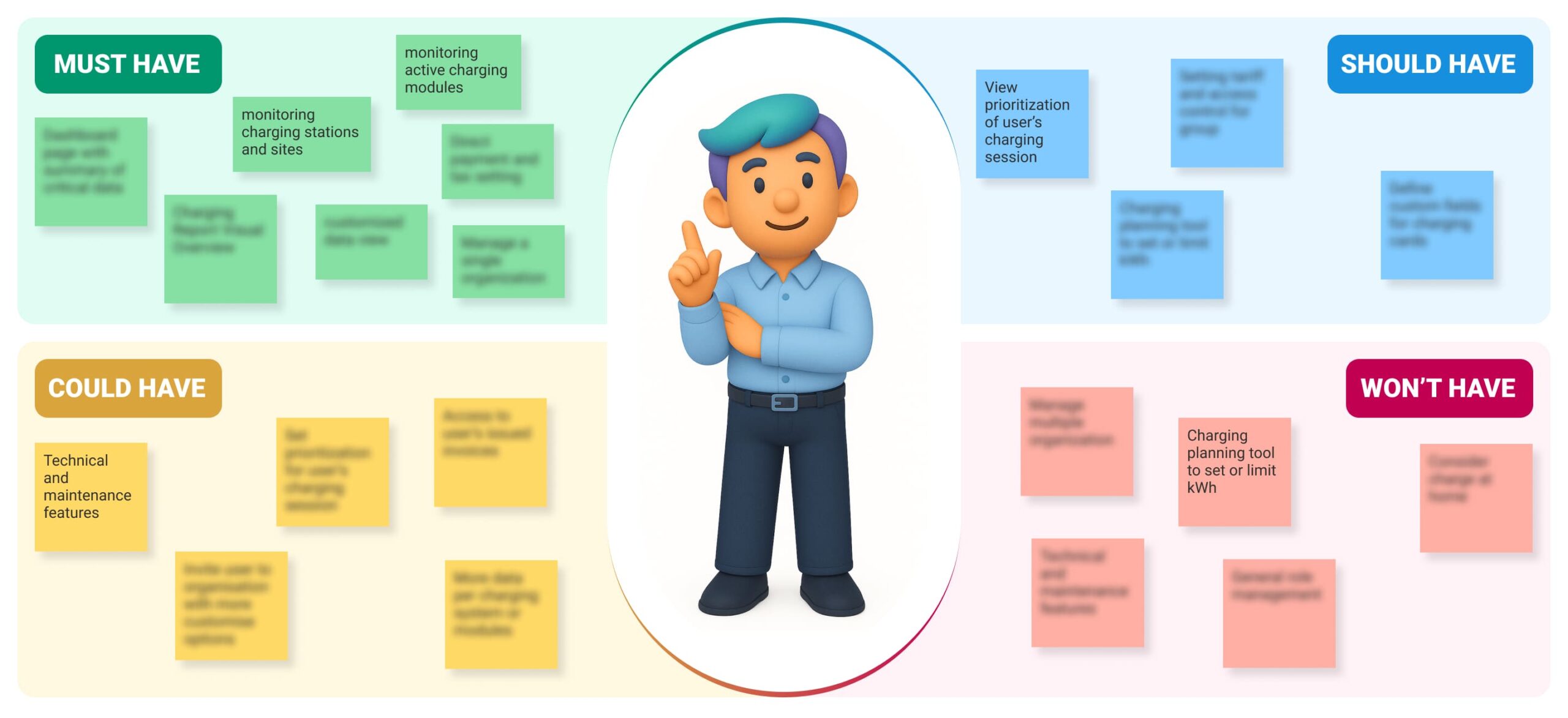
I Prioritized Features with MoSCoW to Turn a Long Wishlist into a Focused Roadmap
For the first release, I prioritized fleet and SME managers because it represented the highest operational complexity, so solving their workflows first created a foundation the simpler customer segments could later build on.
🤩
Now, I am ready to kick off the big refactor of our six-year-old dashboard.
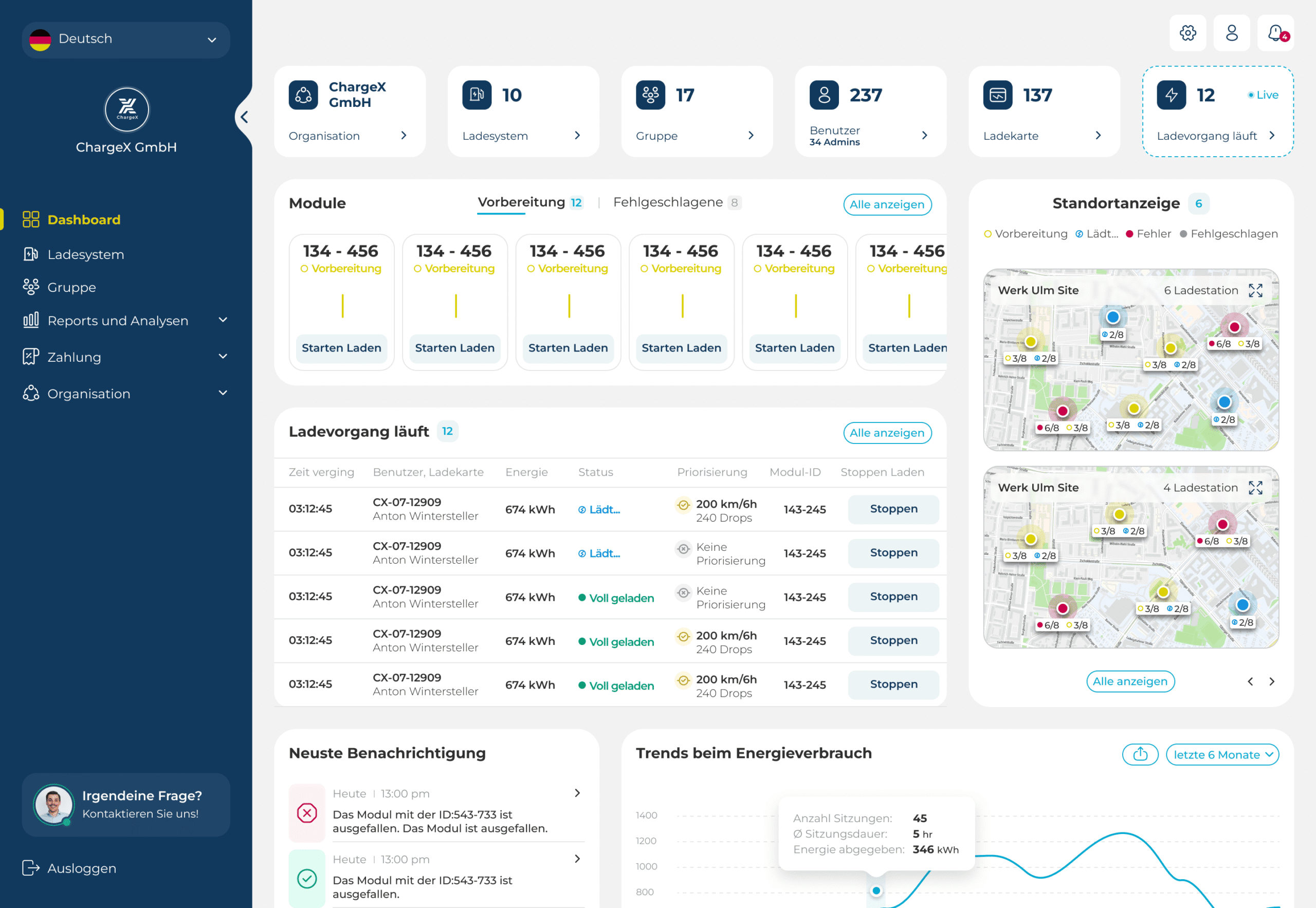
I focused the redesign on one daily problem: admins had to hunt through stations to understand what was happening
For fleet and SME admins, one of the most frequent tasks was monitoring charging infrastructure across the organization.
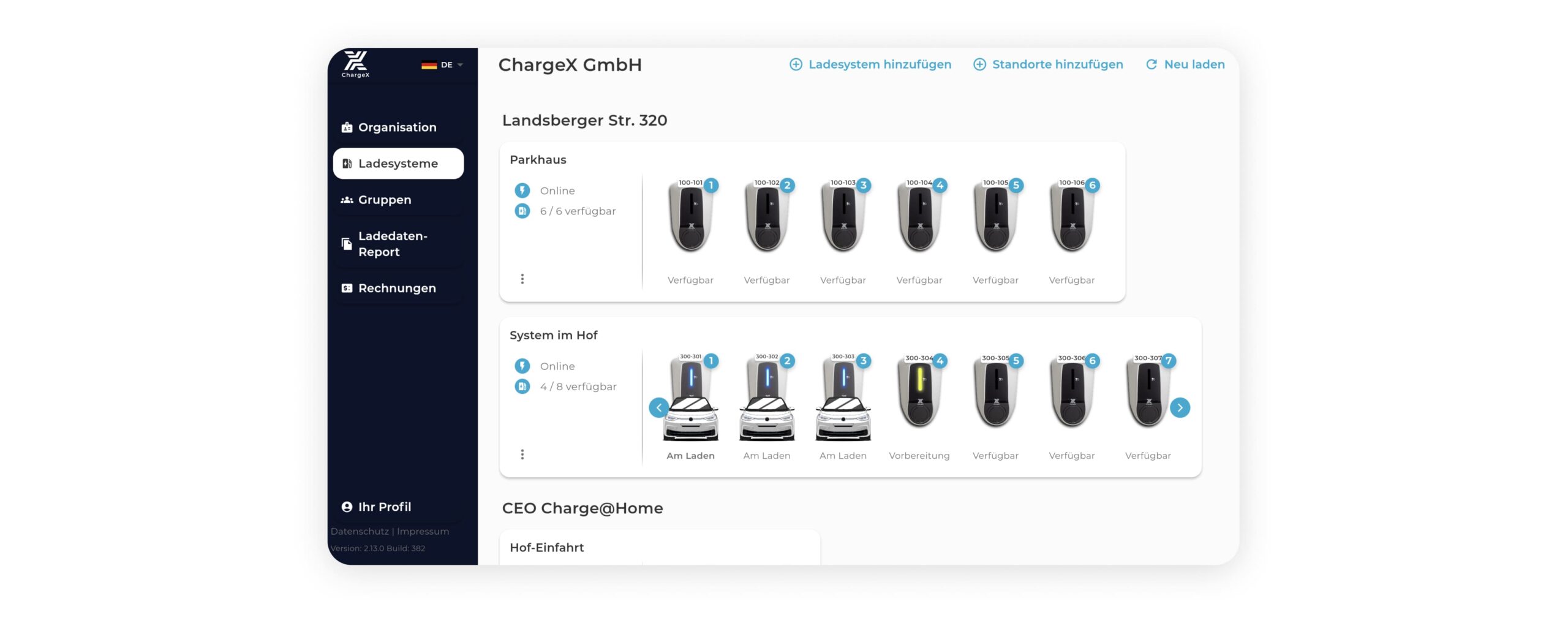
Each organization could contain many charging stations, and each station could contain several charging modules. Multiple modules could be active at the same time.
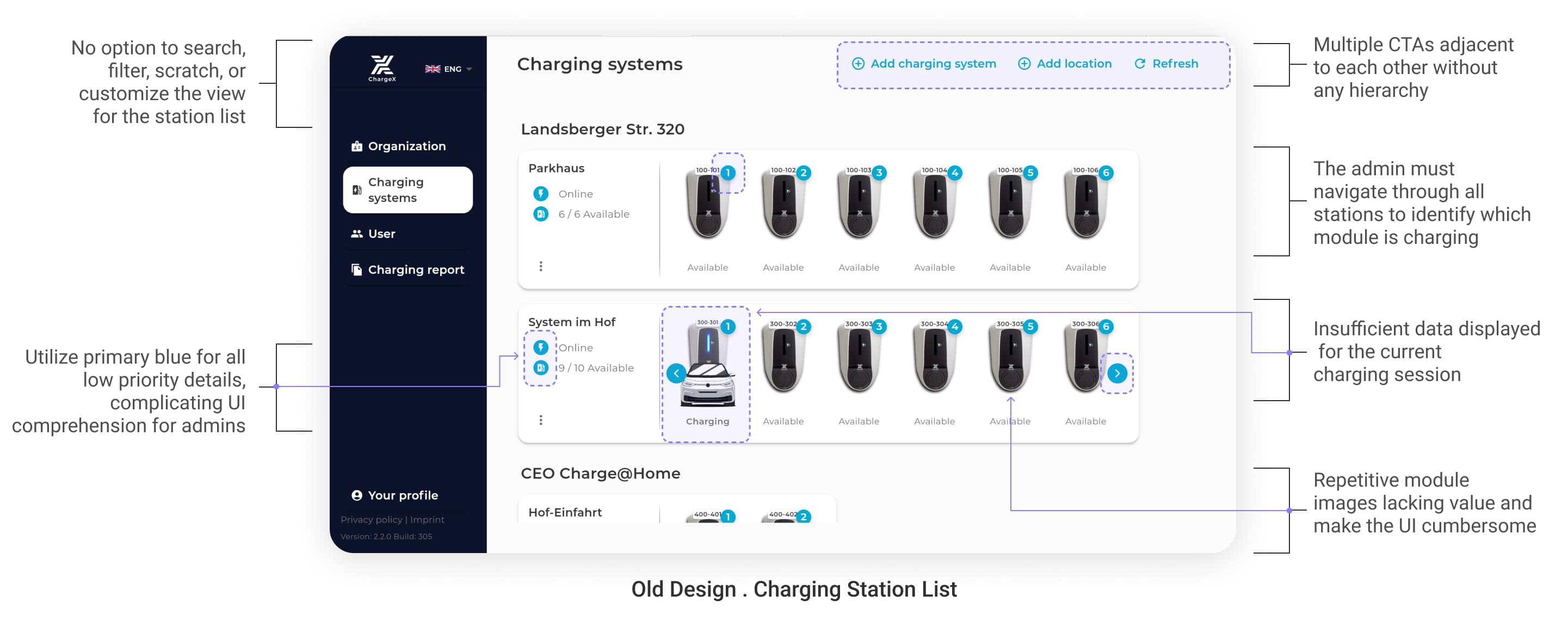
🔴 In the old dashboard, there was no reliable overview of all active modules. Admins had to open or scan stations one by one to understand where charging was happening. This made routine monitoring slow and made it easy to miss active modules.
I defined success around two behaviors before choosing the solution
I wanted the redesign to improve two specific user behaviors:
First, admins should find the correct charging station with less searching.
Second, admins can find and understand active charging sessions without checking stations one by one.
I used those behaviors to define the success metrics.
Charging Station discovery
🟢 Success metric
- Reduce time to find the correct station
- Reduce incorrect station openings
Active charging overview
🟢 Success metric
- Reduce support tickets about active charging sessions
- Reduce manual station-by-station checking
👩💻
I decided to put the new workflow in front of the admin before committing to high-fidelity design and development
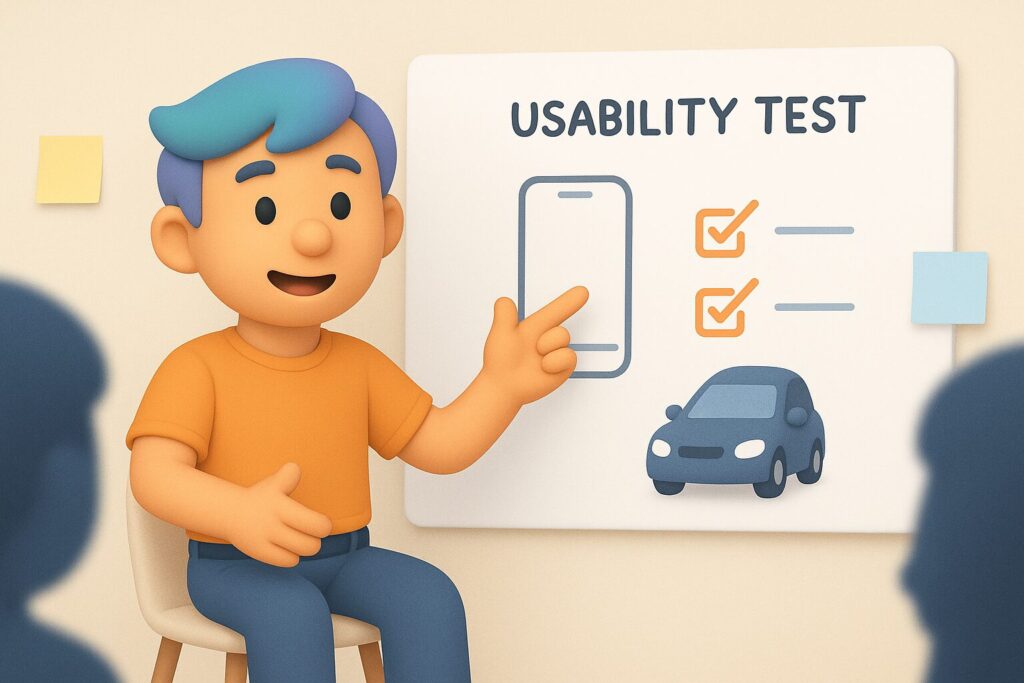
I conducted moderated usability sessions to test the workflow early because the biggest uncertainty was how much information admins needed upfront
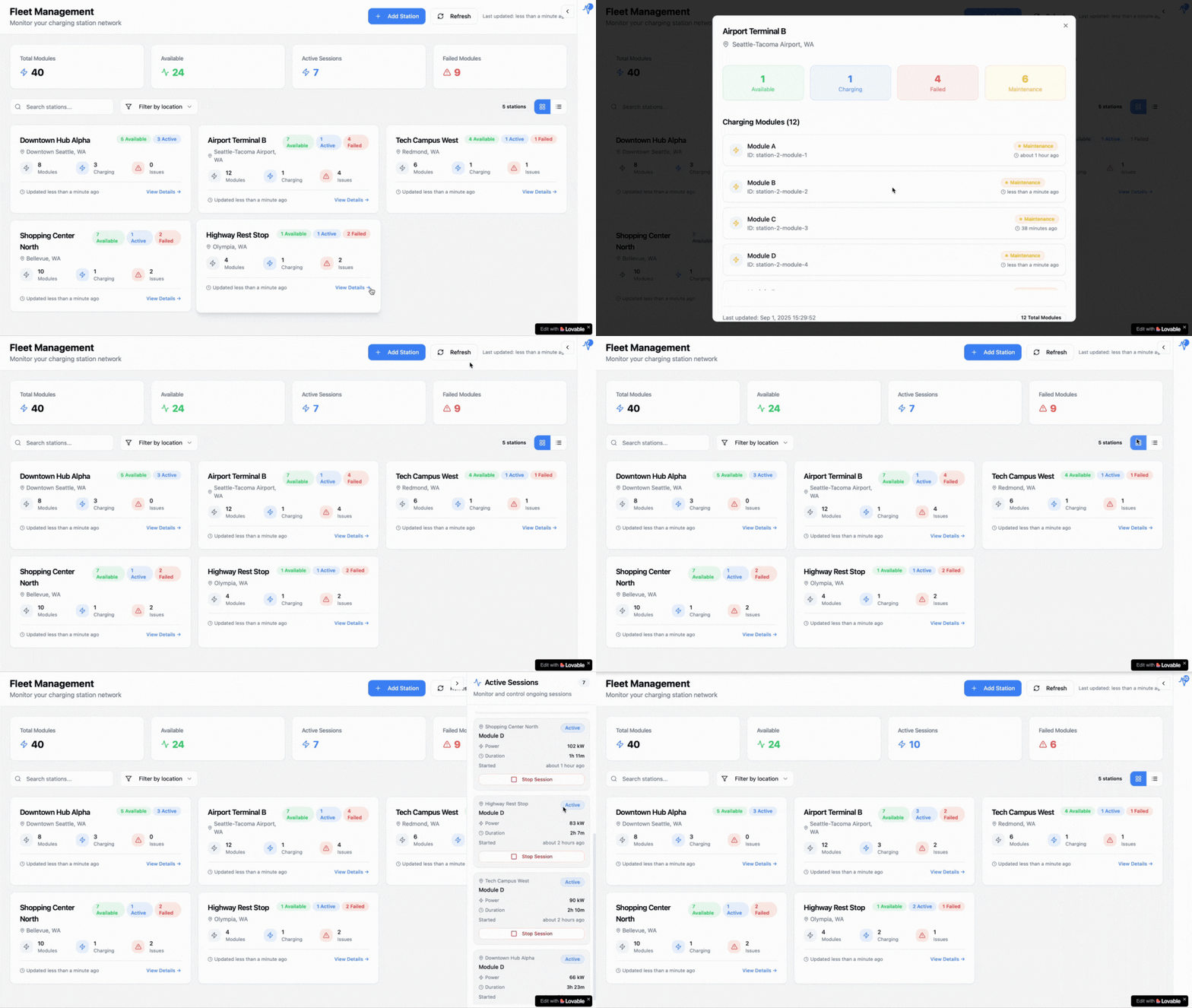
Before committing to high-fidelity design and development, I built an interactive prototype and conducted moderated usability sessions with 11 admins. I asked them to complete realistic operational tasks while thinking aloud, because I wanted to understand not only whether they completed the task, but how they decided where to look first and what information they expected to see.
The test showed three important things:
They wanted module status visible across stations without opening them one by one.
They wanted charging card numbers tied to each session visible instantly.
Search, sorting, and clear status information were necessary once the station list became large.
Finally, I redesigned the station experience around operational scanning, not around individual pages
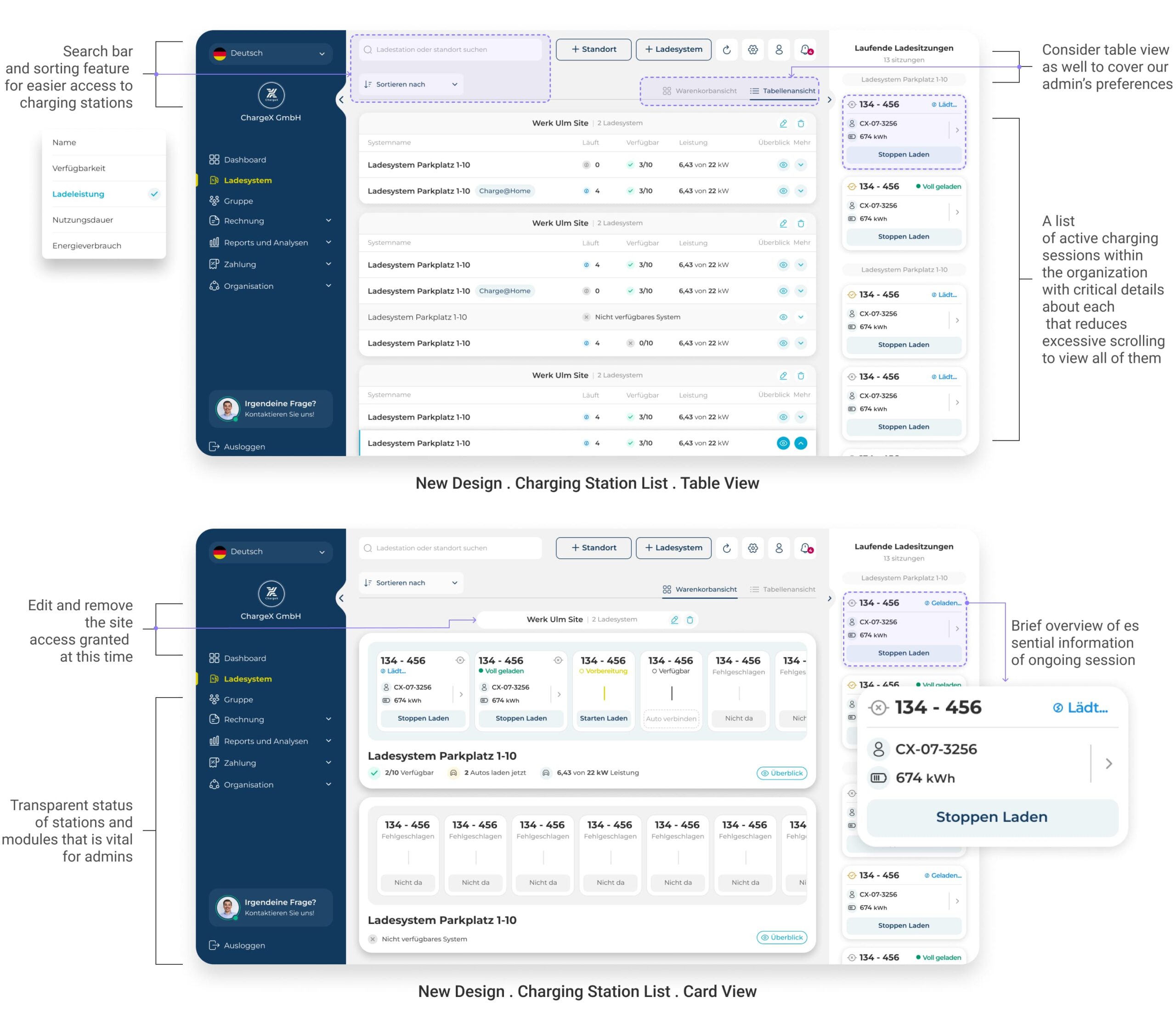
✔️ The final experience introduced a scalable station list with search, sorting, and clearer status hierarchy.
✔️ I surfaced module status directly in the overview, so admins could understand what was happening across stations without opening each one.
✔️ I also created a focused view for ongoing charging activity, giving fleet and SME admins a reliable operational starting point instead of forcing them to reconstruct the system state themselves.
✔️ The design supported both table and card views because different monitoring situations required different levels of density and scanning.
I balanced fast scanning with access to deeper station details
One key trade-off was deciding how much information to show at first glance.
Some admins wanted to see as much data as possible without opening a station. That would reduce clicks, but in larger charging networks it would also make the overview much harder to scan.
So I prioritized the information needed for quick operational decisions: station identity, availability, charging activity, module status, and key session details. I kept secondary information inside the station or module view.
To balance different working styles, I designed two view modes. The table view supports faster scanning across many stations, while the card view shows more module-level detail at a glance.
I also used progressive disclosure, so admins could start with the most important information and open deeper details only when they needed them.
That balance helped preserve density without turning the overview into another unreadable table.
🤓
What changed after launch?
I measured the same behaviors after launch, not general satisfaction
Charging Station lookup time
Dropped from +2 minutes to under 40 seconds.
For station discovery, I measured the time from entering the station overview to opening the correct station. I compared the same workflow before and after the redesign using product event timestamps, supported by session recordings to understand unnecessary searching.
Behavior Changed
Reach the correct charging station directly with minimal searching.
Before the redesign, I reviewed one year of support tickets with Customer Success and grouped the recurring issues around admins not being able to quickly find or understand active charging sessions.
After launch, I compared the same ticket category across the following six months. Support requests related to locating active charging sessions dropped by around 60%.
Behavior Changed
Correctly identify all currently active charging modules across multiple charging stations.
Evidence
- One year of pre-redesign support tickets
- Six months of post-launch support tickets
- Same issue categories compared before and after
- Customer Success feedback during rollout
👥 Customer Expansion and new business revenue
3× new customer segments unlocked
The redesigned platform supported three times more customer segments, and the clearer persona fit contributed to ChargeX’s expansion into new business areas.
The role-based foundation gave Product and Engineering a clearer context for future decisions.
A shared internal understanding of who we are designing for
Sales could explain the platform more clearly to different customer segments.
Customer Success had a shared language for categorizing needs.
Engineering could build new features with a better understanding of who each workflow served.
🤓💡
The redesign solved the immediate monitoring problems, but it also revealed the next system-level challenge !
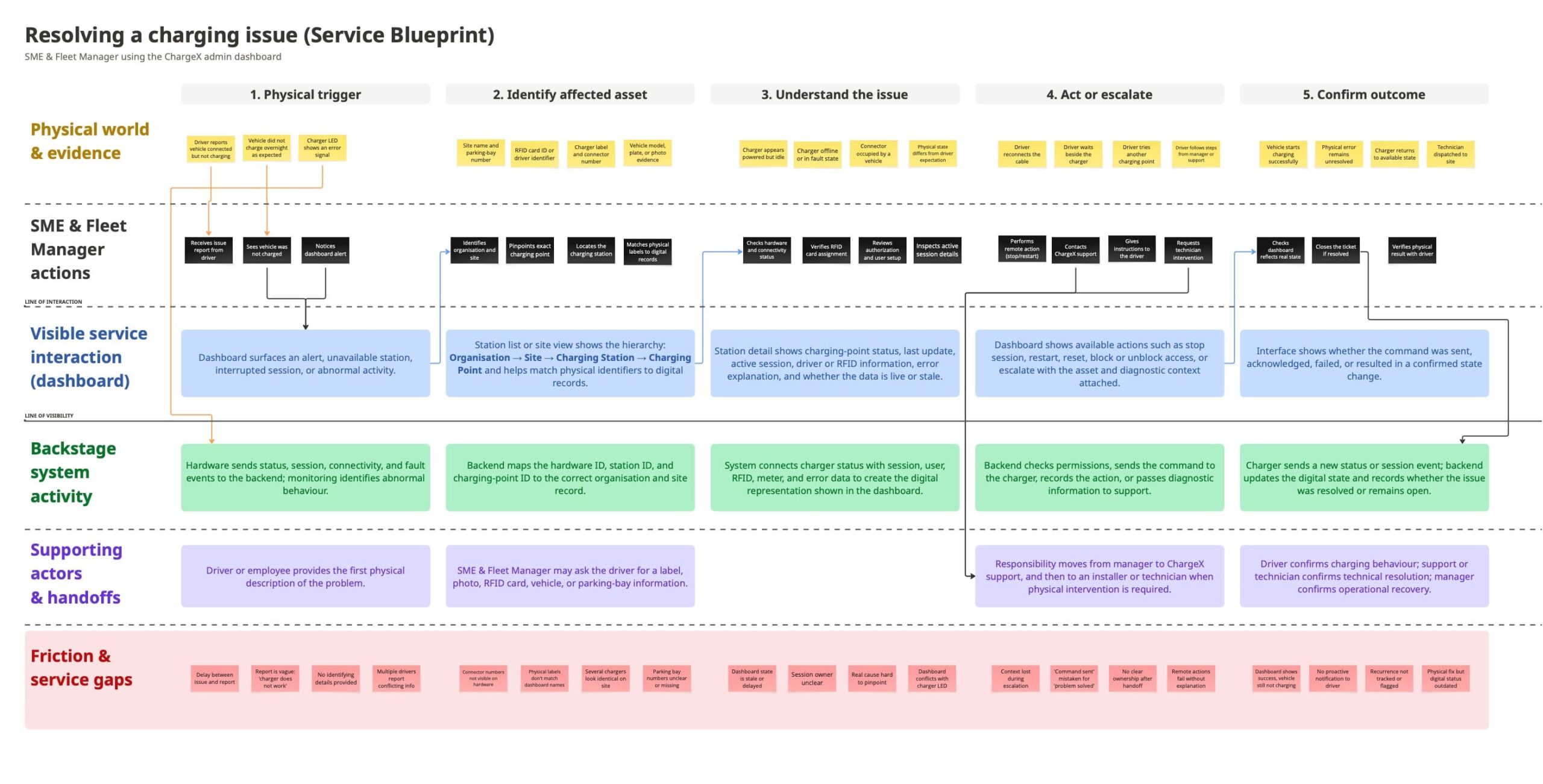
To shape the next iteration of charging issue management, I mapped the full journey before, during, and after the dashboard so I could design beyond the interface
The redesign made station and module monitoring much clearer. But it also showed me where the next challenge would be: what happens when monitoring turns into managing a real charging issue.
That experience does not begin when an admin opens the dashboard, and it does not end when they click an action. It may start with something happening at the charger, a driver reporting a problem, or a physical status that creates uncertainty. And after the dashboard interaction, the admin still needs a clear sense that the situation has actually changed.
So I created a service blueprint to understand that full service around the interface. It helped me see what admins encounter in the physical world before and after the screen, what information they would naturally expect at each point, and what needed to happen backstage for the experience to feel simple and predictable.
More importantly, it exposed edge cases I could design for early; like mismatched physical and digital identifiers, delayed status, missing context, unclear handoffs, or a digital action that does not clearly reflect the real-world outcome. That gave me a much stronger direction for the next iteration of the day-to-day monitoring and issue-management experience.
The version shown here is an abstracted reconstruction due to company NDA.
👀
Take a look at behind the scenes!
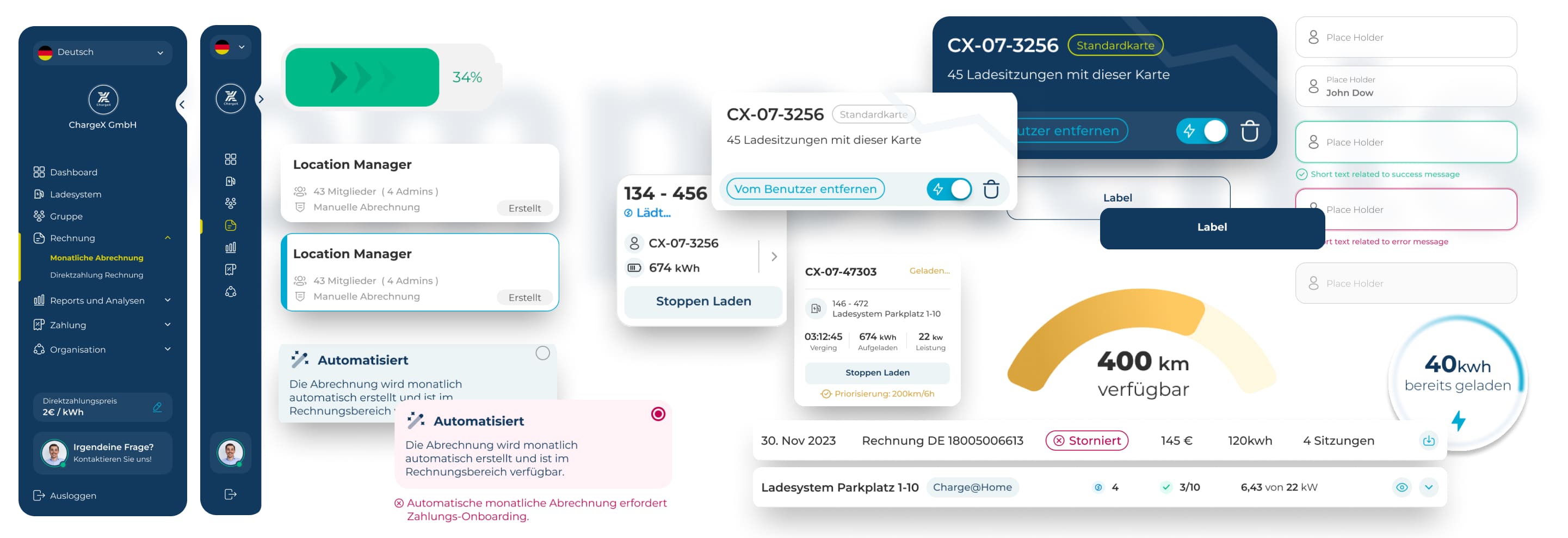
I Built a Scalable Design System with Smart Components and Variants to Ensure Consistency Today and Flexibility for ChargeX’s Future
As the solo product designer, I also took ownership of the design-system foundation behind the new dashboard.
I aligned Figma components with the React implementation, documented states and behaviors, and worked with engineers during adoption so the system became part of the delivery workflow rather than something they worked around.
Over time, component reuse increased, handoff became smoother, and QA surfaced fewer inconsistencies.
👀
What I took from this!
The most valuable outcome was making the product’s hidden structure visible
The work I’m most proud of was not one screen.
It was identifying that ChargeX did not have a feature problem alone. It had no shared model of who the dashboard needed to serve.
Once I made that visible through research and aligned the team around the roles, the architecture, feature priorities, and workflow decisions became much clearer.
That foundation made the redesign more coherent for users and more scalable for the company.
What I'D do differently
I validate the new structure with a wider mix of customer groups a bit earlier.
We did research and testing, but looking back, I think bringing more of those different customer types into the conversation earlier would have given us even more confidence before making such a structural change.
It still worked out well, but that's something I try to do more now whenever I'm designing for products with very different user groups.
Looking to purchase
Designer Assistance 01, 02, 03?
Please send me an email with your request, and I’ll provide you with instructions on how to buy the designer assistance files.